
A customer asks, “Where’s my order?” A chatbot can point them to the tracking page. An agent with access to the order system can check the shipment itself and, if something looks wrong, decide whether to ask for more information or open a support case. The chat window can look identical.
That’s what I mean by agency. The agent can choose its next step and act on it within the permissions we give it.
We’ve built with that idea at Gurusup (@GurusupHQ) from the start. Our customer service agents could already look up records, run configured actions, and hand off conversations. What’s changed is how much of an assignment an agent can work out for itself.
In October, a talk about Grokbot got us asking where always-on agents could help at Gurusup. We started building agents for individual work and for teams. By the next day, we had a first version running internally.
Fran (@Fpastor91), our CTO, wrote about what we built that week.
How we built agents around customer replies
When a customer sent a message, we loaded the agent’s instructions and configured actions and asked it to write a reply or a draft. Along the way, the agent could call tools, hand off the conversation, or pause for approval.
agent = Agent(
    model=model,
    instructions=agent_prompt,
    tools=action_tools,
)

result = await agent.run(
    customer_message,
    message_history=history,
)
Each saved action becomes a tool with a specific job, like looking up an order or updating a record. Our application builds those tools from configuration and routes each call to the code that runs it. Some actions have a subagent of their own that can choose among external tools and work through several steps.
The customer conversation was the unit of work. We saved its context, could schedule follow-ups, and guarded against repeating certain external operations.
Replying to one customer and reviewing the whole support queue ask different things of an agent. For the queue review, we had to decide how much of the procedure to spell out.
Babysitting the agent
For a weekly support review, I could put the whole procedure in the prompt. Call list_overdue_tickets. Keep calling it until there’s no next page. Group the tickets by customer, count them, and flag the accounts that meet the cutoff.
That’s what I mean by babysitting. If I want ticket IDs in next week’s report, I’m back in the prompt adding a step to collect them.
Why agents write code during a run
If the model could write a short program during the run, I could just ask for the new report. The program could collect the ticket IDs as it reads each page.
The person making the request might never see that code. On Cheeky Pint, Mark Zuckerberg (@finkd) described using Muse (@Muse), Meta’s personal agent, to review footage from his MMA training. Muse wrote code to pull frames from the video and gave him feedback on his technique. Zuckerberg predicts that “everyone is actually going to be writing tons of code” and adds, “They’re just not going to know that they’re writing code.”
For an agent to work this way, its code needs somewhere to run and a way to call the tools we give it. Cloudflare’s Code Mode exposes tools as typed methods that generated code can call. Claude’s programmatic tool calling lets a Python script call tools and filter their results before they reach the model. In our agents, we use Pydantic AI Harness’s Code Mode to run generated Python in Monty, where the code calls our tools as Python functions.
Counting overdue tickets with Code Mode
Which customers have at least three overdue support tickets?
With ordinary tool calling, the model can fetch a page, read the result, and decide whether to fetch the next one. For a question that comes up often, we could write a tool that handles the whole tally.
The snippet below shows the Python the model can generate for this question. It sends the program to run_code, and Monty executes it in a sandbox with access to the ticket tool.
counts = {}
cursor = None

while True:
    page = await list_overdue_tickets(cursor=cursor)
    for ticket in page["items"]:
        customer = ticket["customer"]
        counts[customer] = counts.get(customer, 0) + 1

    cursor = page["next_cursor"]
    if cursor is None:
        break

[
    {"customer": customer, "overdue_tickets": count}
    for customer, count in counts.items()
    if count >= 3
]
The loop reads one page at a time and adds each ticket to its customer’s count. Each page tells it where to find the next one. After the last page, the program returns just the customers with at least three overdue tickets and their counts. The model uses that list to write the answer.
Try Tool Calling and Code Mode side by side
I built a small demo so you can run the ticket question yourself. Both agents get the same model and tools. Click Run both agents and open Execution trace in each panel. Then try Enterprise SLAs to see what happens when the agent also needs customer profiles, or Code Mode issues to compare the two modes on a single GitHub search. You can also type your own question.
P.S. I deployed the demo on @fastapicloud. If you haven’t tried it yet, give it a shot. I also used @fastapi to stream both agents’ responses live, but I’ll get into that side of FastAPI in another post.
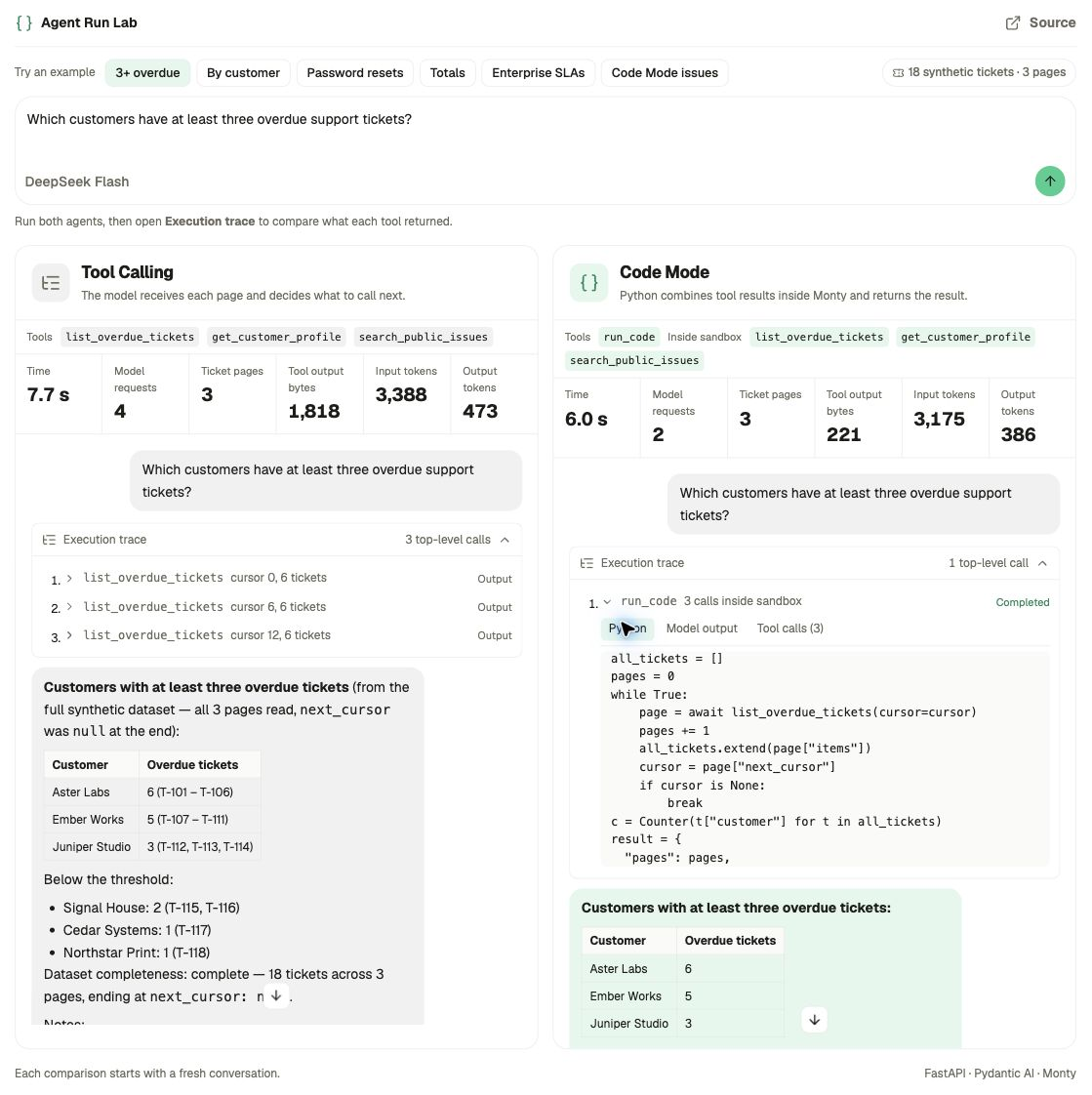
Both agents read the same three pages. On the right, the generated Python follows next_cursor and counts tickets inside one run_code call. In this run, Code Mode took two model requests instead of four.
Both agents start with the same three tools. The right panel adds CodeMode, which exposes those tools to the Python program and gives the model run_code.
tools = [list_overdue_tickets, get_customer_profile, search_public_issues]

# Left panel: Tool Calling
tool_calling_agent = Agent(model, tools=tools)

# Right panel: Code Mode
code_mode_agent = Agent(
    model,
    tools=tools,
    capabilities=[CodeMode(tools=[tool.__name__ for tool in tools])],
)
Where the model steps in
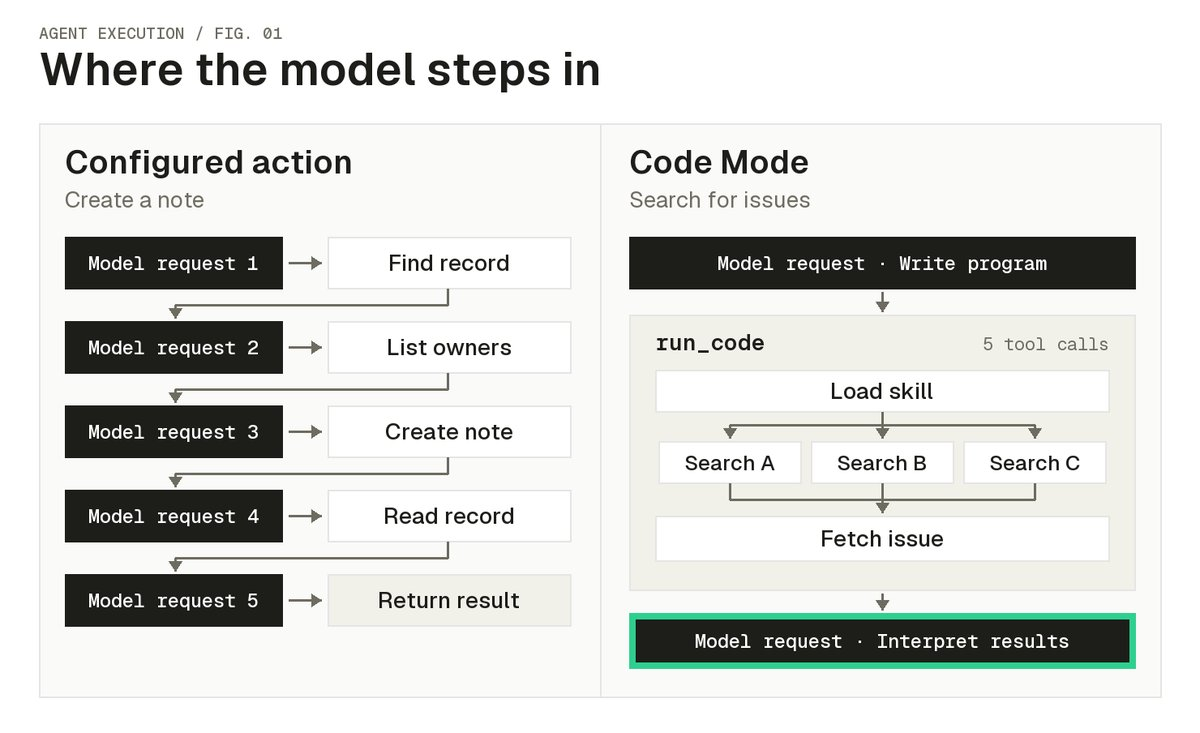
The ticket demo compares both modes on one question. The diagram below shows two different tasks from our agents. On the left, the model gets each result before calling the next tool to create a note. On the right, one program loads a skill, searches for issues in parallel, and fetches an issue before handing control back to the model.
Why this helps with broader tasks
- Fewer trips to the model. A loop can fetch the next page without another model request. That can save time and tokens on a paginated query, though the external API calls still happen.
- Less data in context. The program can filter and combine tool results so the model only has to read the fields it needs.
- More jobs from the same tools. The same agent can use issue search to write a project update or check what’s missing from a release. It can combine the search with different tools for each job.
How much context you save depends on what the program returns. In our traces, some programs returned a few fields and others printed entire tool responses.
How the generated Python runs
Code Mode runs the generated program in Monty, a sandbox written in Rust that supports a subset of Python. The program can call the host functions we expose.
When the program calls list_overdue_tickets, the host tool calls the ticket API and passes the result back to Monty. We enforce permissions on the host side.
We expose the ticket tool by name and set limits on tool calls and memory.
agent = Agent(
    model=model,
    instructions=agent_goal,
    tools=[list_overdue_tickets],
    capabilities=[
        CodeMode(
            tools=["list_overdue_tickets"],
            max_tool_calls=25,
            resource_limits={"max_memory": 128 * 1024 * 1024},
        ),
    ],
)
What modern agents need beyond Code Mode
Code Mode changed how much of an assignment I can hand to the agent. For the weekly support review, the same loop can count the tickets. If I also want a spreadsheet, an explanation of what’s holding up the oldest tickets, and a chance to review the report before it goes out, the harness has more work to do.
A sandbox
In a separate sandbox, the agent can use the shell to run a script that builds the spreadsheet, then reopen the file to check the totals. The shell also gives it a way to use the programs already installed there for jobs we haven’t written a dedicated tool for.
Pausing and resuming work
The agent can wait for my approval before sharing the report. We use Temporal to save the run’s progress, so another worker can pick it up and reuse the results it already has.
Delegation and context
The agent can send the investigation into the oldest tickets to a subagent while it builds the spreadsheet. The subagent works in its own conversation and returns its findings for the report.
As the run grows, we compact older messages and save large tool results separately, a technique called tool output spilling. The agent can look up a detail it needs without loading every ticket into context or fetching the queue again.
Tell the agent what to do, not how to do it
We built our earlier agents around a job we knew well. They could look up orders, update records, and ask for approval while handling a customer message. Today, Code Mode lets an agent combine those tools in a procedure it writes for the assignment at hand. As I give the agent more room to decide how to work, I spend more time on what the harness needs to enforce. Which actions can it take? What progress can it recover? When does it need a person to step in?
I plan to write more about the rest of the harness, from giving agents shell access to delegating work and managing context.
guest@gurusup > /posts
guest@gurusup > /install · connect Gurusup Brain to your agents
Get started - free